Automotive Dealer Management Software
Manage your dealership operations with MotoTrade’s automotive dealer management software. Bring vehicle records, customer enquiries, purchase and sales information, quotations, and billing activities together through one connected platform designed for car and bike dealerships.
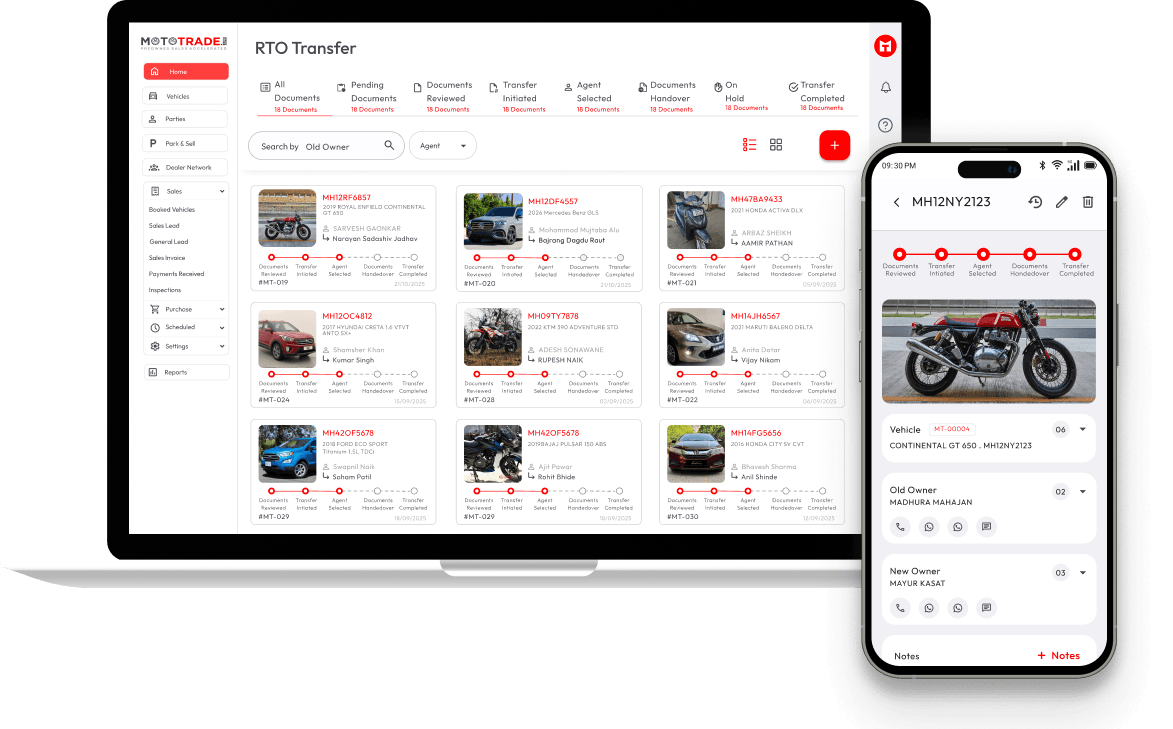
Bring Your Dealership Operations Together
Running a vehicle dealership involves coordinating multiple activities, from maintaining vehicle records to handling customer enquiries and recording sales transactions. When information is scattered across spreadsheets, registers, and separate systems, accessing the right details can become time-consuming.
MotoTrade‘s auto dealership management software helps organise essential dealership information within one platform. It connects supported business activities so your team can access relevant records, manage daily workflows, and maintain a clearer view of dealership operations.Whether you operate a used car showroom or a bike dealership, an organised digital workflow can help you manage business information more consistently.
Whether you operate a used car showroom or a bike dealership, an organised digital workflow can help you manage business information more consistently.
Essential Capabilities for Managing a Vehicle Dealership

Vehicle and Stock Records
Maintain organised vehicle information, including relevant details, pricing, and availability. Having structured inventory records helps your team access vehicle information during daily dealership activities.

Customer and Sales Enquiry Management
Keep customer enquiries and lead information organised alongside your dealership activities. MotoTrade’s CRM functionality helps your team manage customer interactions and follow-ups through a structured process.

Purchase and Sales Records
Maintain relevant information about vehicle purchases and sales. Organised transaction records help your dealership keep track of business activities and connect vehicle information with the sales process.
Quotations and Billing
Manage quotation and billing activities through MotoTrade’s supported dealership workflows. Keeping relevant transaction information organised helps your team access records during sales and billing activities.
Dealership Reports and Performance Tracking
Use available reports to review relevant sales and transaction information. Access to organised business records can help dealership owners understand their operations and make informed decisions.
How Automotive Dealer Management Software Supports Daily Operations
A connected dealership platform helps bring different business activities into a structured workflow.
01
Record Vehicle Information
Maintain relevant details about vehicles entering your dealership.
02
Organise Your Inventory
Keep vehicle records, pricing, and availability information organised.
03
Manage Customer Enquiries
Access customer and lead information while handling potential buyers.
04
Process Sales Activities
Use quotations and billing functionality as part of the dealership sales process.
05
Maintain Business Records
Keep relevant purchase, sales, and transaction information organised for ongoing operations.
MotoTrade connects these supported activities, helping dealerships manage business information without treating every process as a separate task.
Manual Dealership Management vs MotoTrade Software
Managing a dealership through registers, spreadsheets, and separate records can make it difficult to keep business information organised. MotoTrade brings essential dealership activities together, helping car and bike dealers manage their daily operations through one platform.
Manual Management | MotoTrade Software |
Vehicle details are maintained across separate records. | Organise vehicle information through inventory management. |
Customer enquiries and follow-ups may be scattered across different channels. | Manage customer leads and follow-ups through CRM functionality. |
Purchase and sales records may require manual consolidation. | Maintain purchase and sales information through supported dealership workflows. |
Billing information may be maintained separately from other records. | Connect billing activities with your dealership workflow. |
Finding relevant business information can require checking multiple records. | Access organised dealership information through the platform. |
Reviewing business performance may involve compiling information manually. | Use available reports to review relevant dealership activities. |
Auto Dealership Management Software for Car and Bike Businesses
For Used Car Dealerships
Used car dealers manage vehicles with different models, specifications, prices, and availability. MotoTrade helps organise vehicle information, customer enquiries, and sales-related activities through its dealership platform.
For Bike and Two-Wheeler Dealerships
Two-wheeler dealers need to maintain vehicle records, respond to buyer enquiries, and manage sales activities. MotoTrade supports dealership workflows that help organise this information and connect relevant operations.
For Multi-Brand Dealerships
Dealerships handling different vehicle categories need structured records and coordinated workflows. MotoTrade’s supported dealership features help teams organise relevant information across their operations.
For Growing Dealership Businesses
As dealership operations expand, maintaining consistent records becomes increasingly important. A connected platform can help teams access relevant business information and coordinate supported activities more efficiently.
Why Choose MotoTrade for Automotive Dealer Management?
Connected Dealership Workflows
Manage supported activities such as inventory, customer enquiries, quotations, and billing through one platform.
Organised Business Information
Maintain structured vehicle, customer, and transaction records.
Better Access to Vehicle Details
Refer to relevant inventory information while handling customer enquiries and sales activities.
Simplified Daily Operations
Connect related dealership activities through a more organised digital workflow.
Access Across Supported Devices
Access relevant dealership information through MotoTrade’s supported device access and synchronisation capabilities.
MotoTrade brings essential dealership functions together to help car and bike dealers manage their day-to-day operations through a connected platform.
Frequently Asked Questions
What is automotive dealer management software?
Automotive dealer management software helps vehicle dealerships organise and manage business activities such as vehicle records, customer enquiries, purchase and sales information, quotations, billing, and reporting, depending on the platform’s features.
How does auto dealership management software help dealers?
Auto dealership management software helps organise dealership information and connect related workflows. This can make it easier for teams to access vehicle records, manage customer enquiries, and maintain sales and transaction information.
Can automotive dealer management software be used for car and bike dealerships?
Yes. Automotive dealership software can support car and bike businesses when the platform includes the relevant vehicle categories and workflows. MotoTrade is designed to support its supported car and bike dealership operations.
Can auto dealership management software manage inventory and billing together?
A platform that integrates inventory and billing functionality can help dealers connect vehicle information with transaction workflows. MotoTrade provides inventory and billing capabilities within its dealership platform.
Is automotive dealer management software suitable for small dealerships?
It can be useful for small dealerships that want to organise vehicle records, customer enquiries, and sales-related information digitally. The right solution depends on the dealership’s requirements and the platform’s supported features.
Organise Your Dealership Operations With MotoTrade
Bring vehicle information, customer enquiries, and sales-related activities together with MotoTrade’s automotive dealer management software.